Arnabot
Arnabot
Arnabot
AI Project Management Assistant
AI assistant that turns unstructured team conversations into project management actions—eliminating 4 hours of weekly overhead per PM


My Role
My Role
My Role
Design Lead
Design Lead
Design Lead
Timeline
Timeline
Timeline
Q2 2025
Q2 2025
Q2 2025
Team
Team
Team
1 Designer, 1 AI engineer , 2 DevOps
Overview
Overview
Overview
Background
I joined this project after connecting with an AI engineer who was frustrated by how much time his team spent updating project management tools instead of building. We assembled a small team (1 designer, 1 AI engineer, 2 DevOps) to solve a problem we all experienced firsthand: teams were drowning in PM overhead, spending 4+ hours weekly organizing work across scattered tools rather than executing it.
Challenge
Small teams and individual contributors were drowning in project management overhead. Traditional PM tools required too much upfront structure, while async collaboration left work scattered across docs, Slack threads, and personal notes.
The core problem: teams spent more time organizing work than executing it.
Background
I joined this project after connecting with an AI engineer who was frustrated by how much time his team spent updating project management tools instead of building. We assembled a small team (1 designer, 1 AI engineer, 2 DevOps) to solve a problem we all experienced firsthand: teams were drowning in PM overhead, spending 4+ hours weekly organizing work across scattered tools rather than executing it.
Challenge
Small teams and individual contributors were drowning in project management overhead. Traditional PM tools required too much upfront structure, while async collaboration left work scattered across docs, Slack threads, and personal notes.
The core problem: teams spent more time organizing work than executing it.
Research
& Discovery
Research & Discovery
Research
& Discovery
What I did
Surveyed 47 PMs managing AI development projects at tech companies (Series A-C stage)
Analyzed 4 leading PM tools (Jira, Monday, Trello, Agile)
Conducted secondary research analyzing industry reports, articles, and blogs on project management trends and challenges
What I did
Surveyed 47 PMs managing AI development projects at tech companies (Series A-C stage)
Analyzed 4 leading PM tools (Jira, Monday, Trello, Agile)
Conducted secondary research analyzing industry reports, articles, and blogs on project management trends and challenges
Key findings
Unstructured input is the norm
83% of teams start with Slack threads, whiteboard or voice notes. Industry data confirms ~80% of organizational information is unstructured, yet tools like Jira force immediate structure, creating friction at project inception. 🔗
Context switching costs 4 hours/week
My survey found teams lose 45min/day toggling between tools. Broader research shows workers switch apps 1,200+ times daily, losing ~4 hours weekly. 🔗
AI projects need different primitives
Data science involves extended research and unknowns, unlike traditional dev work. Teams track experiments and model iterations. Organizations adapting agile for AI work must customize fields or use separate experiment tracking tools. 🔗
The "planning theater" problem
PMs invest 2+ hours crafting detailed plans to satisfy stakeholders, yet reality forces immediate updates. In my interviews, teams consistently reported plans becoming outdated within days. They wanted lightweight, living plans — Kanban boards that evolve daily, not static Gantt charts that don't survive first contact with execution.
"Responding to change over following a plan."
Collaboration happens in comments, not tasks
most critical decisions like clarifications, implementation choices & status updates, lived in comment threads, not task fields. Teams tag each other, discuss, and decide within comments. Tools weren't designed for this conversational workflow.
Key findings
Unstructured input is the norm
83% of teams start with Slack threads, whiteboard or voice notes. Industry data confirms ~80% of organizational information is unstructured, yet tools like Jira force immediate structure, creating friction at project inception. 🔗
Context switching costs 4 hours/week
My survey found teams lose 45min/day toggling between tools. Broader research shows workers switch apps 1,200+ times daily, losing ~4 hours weekly. 🔗
AI projects need different primitives
Data science involves extended research and unknowns, unlike traditional dev work. Teams track experiments and model iterations. Organizations adapting agile for AI work must customize fields or use separate experiment tracking tools. 🔗
The "planning theater" problem
PMs invest 2+ hours crafting detailed plans to satisfy stakeholders, yet reality forces immediate updates. In my interviews, teams consistently reported plans becoming outdated within days. They wanted lightweight, living plans — Kanban boards that evolve daily, not static Gantt charts that don't survive first contact with execution.
"Responding to change over following a plan."
Collaboration happens in comments, not tasks
most critical decisions like clarifications, implementation choices & status updates, lived in comment threads, not task fields. Teams tag each other, discuss, and decide within comments. Tools weren't designed for this conversational workflow.
PMs don't need another PM tool. They need their existing conversations to become their project management system.
Solutions
Solutions
Solutions
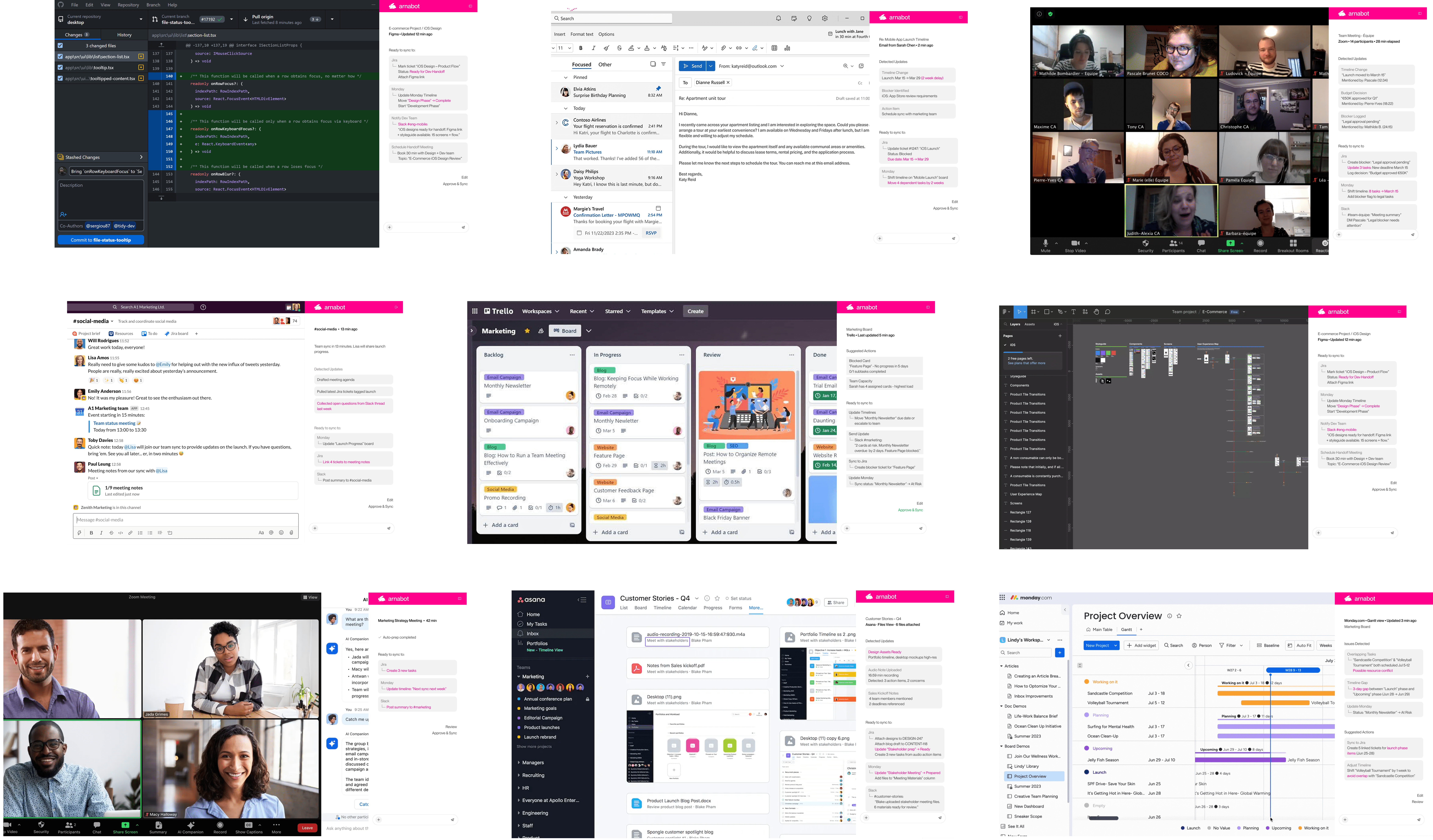
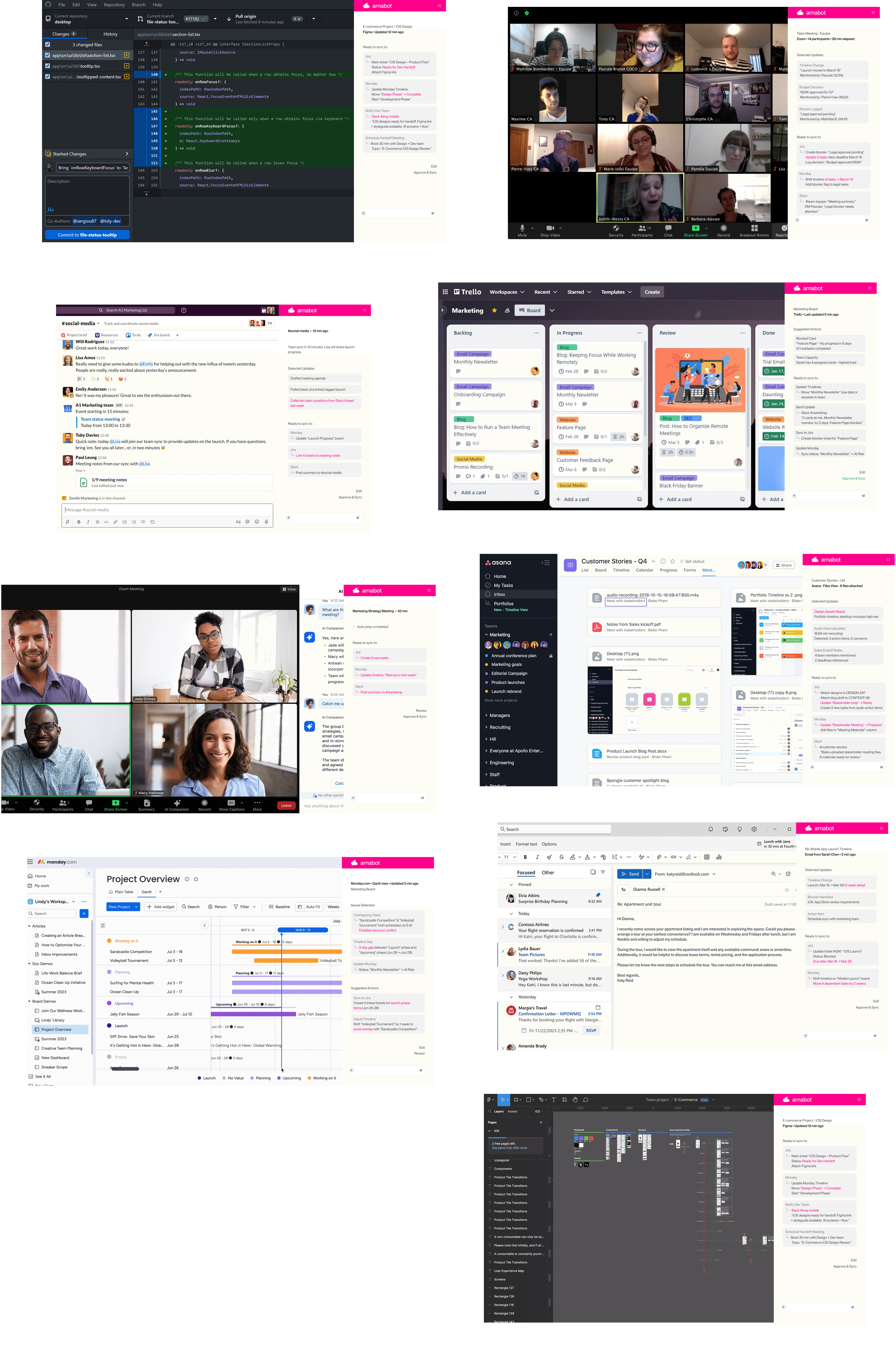
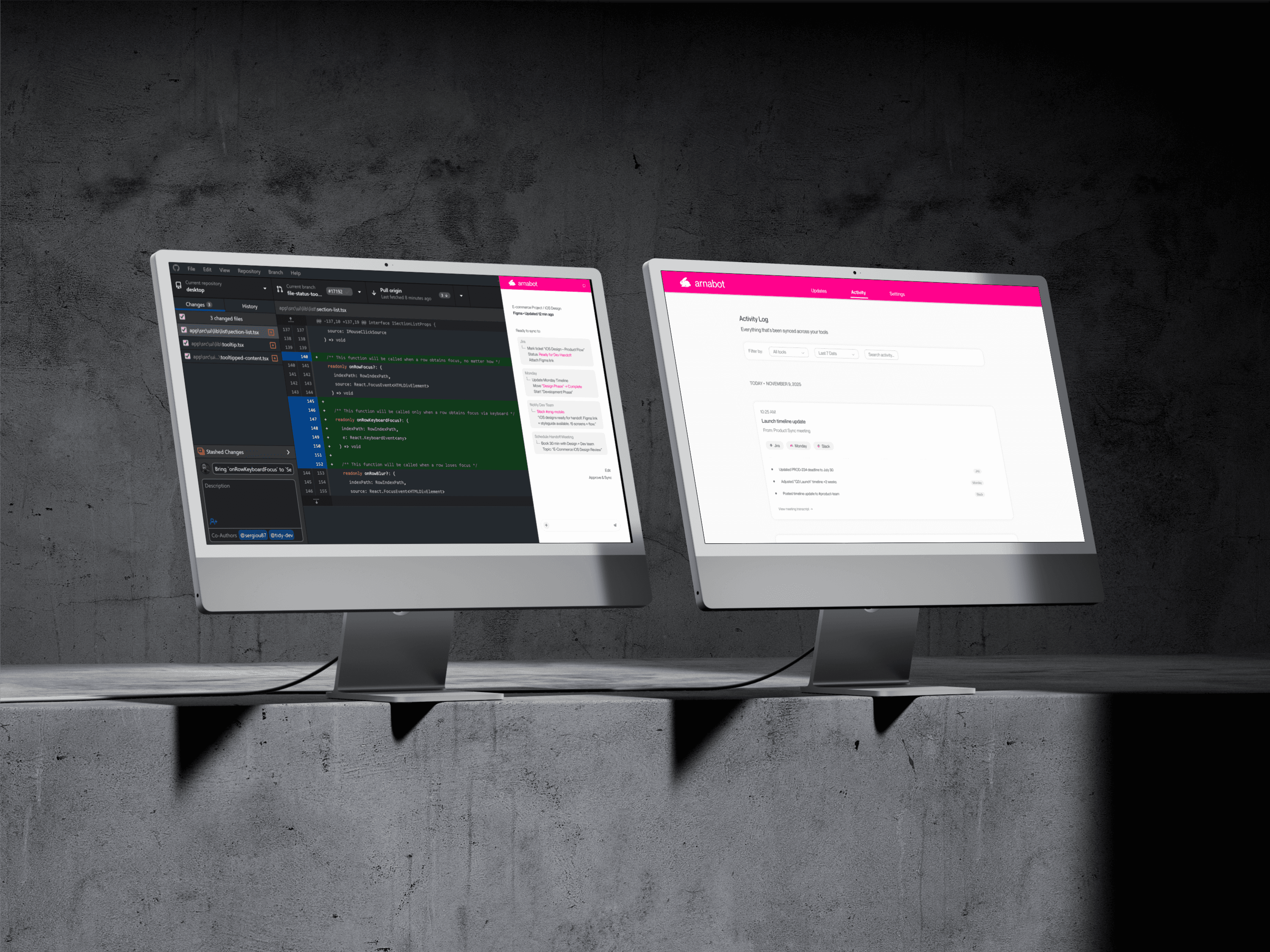
Side Panel —
Work Where Teams Already Are
Matching Product to AI Readiness
Design Challenge
When to surface AI suggestions without interrupting workflow?
I tested three approaches:
real-time suggestions that sent constant notifications
AI as an active collaborator that was always present in the interface
Passive listening with on-demand summaries.
The first two failed—users found them intrusive and distracting. The third approach succeeded: AI listens silently in the background and surfaces insights only at natural breaks (when a meeting ends or a thread closes). This shifted AI from "intrusive bot" to "helpful memory."
Design Challenge
When to surface AI suggestions without interrupting workflow?
I tested three approaches:
real-time suggestions that sent constant notifications
AI as an active collaborator that was always present in the interface
Passive listening with on-demand summaries.
The first two failed—users found them intrusive and distracting. The third approach succeeded: AI listens silently in the background and surfaces insights only at natural breaks (when a meeting ends or a thread closes). This shifted AI from "intrusive bot" to "helpful memory."
How it solves the problem
Instead of PMs manually updating 3-5 tools after each meeting, AI proposes cross-tool updates in one preview screen. User reviews and approves in 30 seconds.
How it solves the problem
Instead of PMs manually updating 3-5 tools after each meeting, AI proposes crosstool updates in one preview screen. User reviews and approves in 30 seconds.
How it solves the problem
Instead of PMs manually updating 3-5 tools after each meeting, AI proposes cross-tool updates in one preview screen. User reviews and approves in 30 seconds.


Mobile —
Approve Anywhere
Mobile —
Approve Anywhere
Mobile —
Approve Anywhere
Research insight:
Users distrust AI they can't audit. Even if AI is 95% accurate, the 5% of mistakes erode all trust.
My approach
PMs are in back to back meetings. No time for desktop. Updates pile up. Mobile app lets them approve in 15 seconds during breaks. so I design a mobile-first approval flow optimized for quick decisions between meetings.
My approach
PMs are in back to back meetings. No time for desktop. Updates pile up. Mobile app lets them approve in 15 seconds during breaks. so I design a mobile-first approval flow optimized for quick decisions between meetings.
Unexpected value I discovered
During user interviews, a PM said: "Our auditors ask 'Why did you change the timeline?' I usually get confused before I answer."
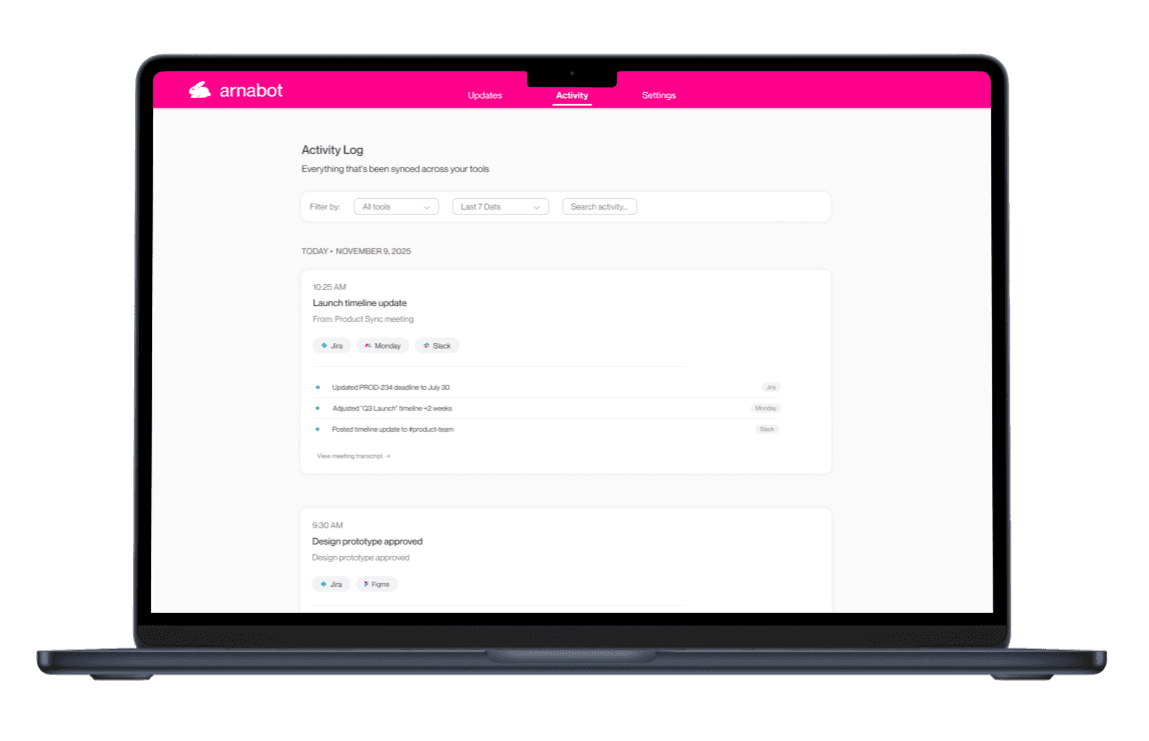
It turns out that the activity page isn't just for users—it's for organizational memory.


One-page summary:
Radical Transparency
Unified Filtering System
Research insight
Users distrust AI they can't audit. Even if AI is 95% accurate, the 5% of mistakes erode all trust.
What I designed
Dedicated web page showing every AI action with full audit trail and undo controls.
How it solves the problem
"What did the AI do this week?" Without visibility, teams don't adopt automation. Dashboard builds trust through complete transparency.


Impact
& Outcomes
Impact & Outcomes
Impact & Outcomes
4 hours saved weekly per PM by consolidating updates across 3-5 tools
15-second mobile flow enabled updates during meeting breaks
83% reduction in coordination overhead
Launched MVP validating core hypothesis: PMs need their conversations to become their PM system
4 hours saved weekly per PM by consolidating updates across 3-5 tools
15-second mobile flow enabled updates during meeting breaks
83% reduction in coordination overhead
Launched MVP validating core hypothesis: PMs need their conversations to become their PM system
What I Owned
& Learned
What I Owned & Learned
Product vision evolved through design
I started with a simple transcription dashboard. Through iterations, I realized the real need was a side panel that syncs across tools, but users needed a "home base." This led me to design the desktop activity page as the source of truth.
Mobile solved an unexpected use case
During user interviews, I discovered PMs miss context during back-to-back meetings. I added mobile quick-view so they can catch up in 15 seconds without interrupting workflow, turning a gap in attention into a design opportunity.
AI products need grounding mechanisms
I learned that ephemeral AI suggestions (side panels, notifications) create anxiety without a persistent place to review decisions. The activity page became that anchor, proving that AI tools need both real time assistance and retrospective visibility.
Product vision evolved through design
I started with a simple transcription dashboard. Through iterations, I realized the real need was a side panel that syncs across tools, but users needed a "home base." This led me to design the desktop activity page as the source of truth.
Mobile solved an unexpected use case
During user interviews, I discovered PMs miss context during back-to-back meetings. I added mobile quick-view so they can catch up in 15 seconds without interrupting workflow, turning a gap in attention into a design opportunity.
AI products need grounding mechanisms
I learned that ephemeral AI suggestions (side panels, notifications) create anxiety without a persistent place to review decisions. The activity page became that anchor, proving that AI tools need both real time assistance and retrospective visibility.